Contents of the guide
The main window, part by part
The main window has three columns: the players at the left, the range of the selected player in the centre, and the equity and the side panel at the right. The numbers below match the markers in the picture.
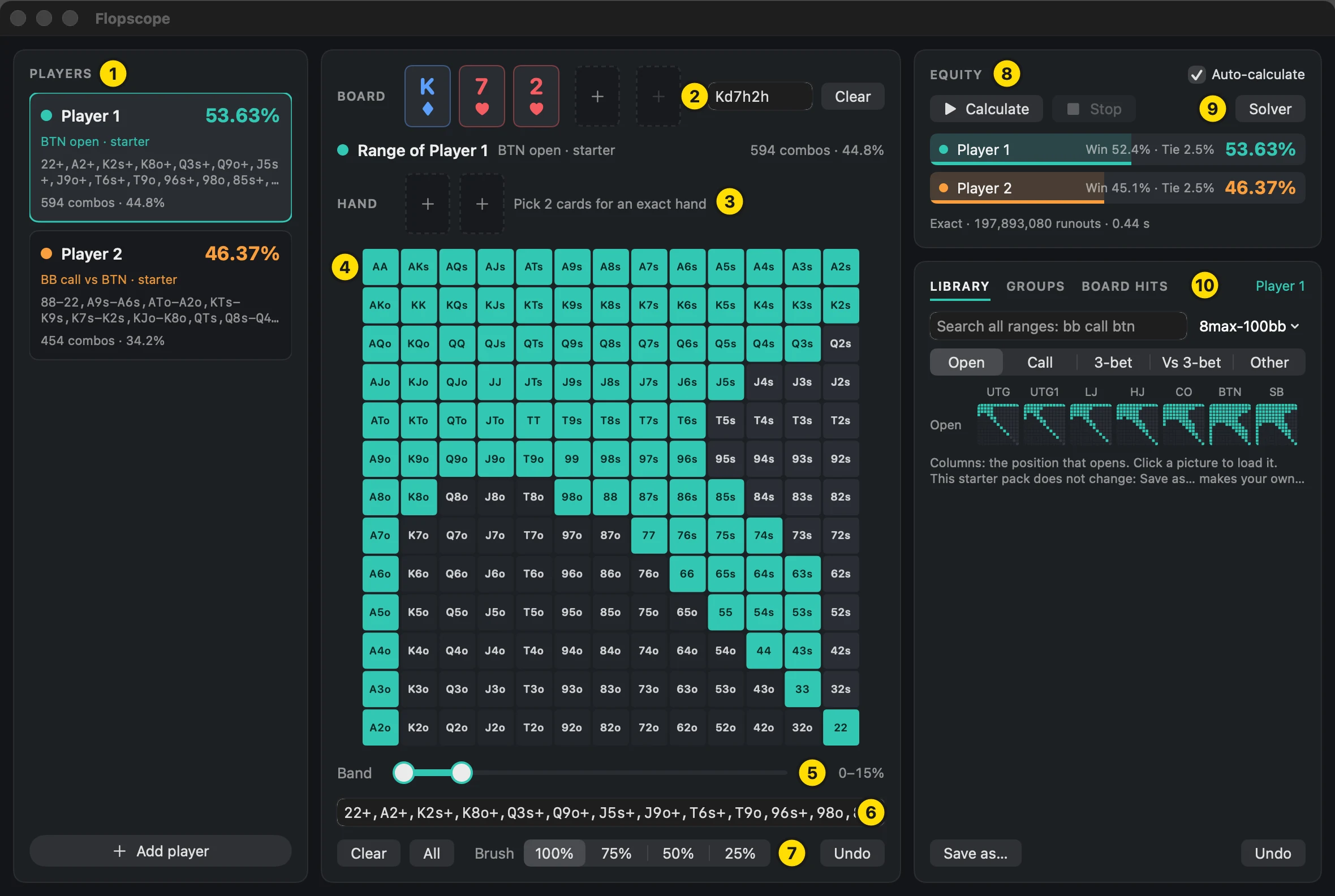
- Players. One card for each player, 2 to 6. Click a card to select that player: the centre then shows its range. A card shows where the range came from, its text, its combos and its equity. Add player at the bottom adds a player with a random range.
- Board. Click a slot to pick a card, or type the cards in the field and press Return, for example
Kd7h2h. Clear removes them. - Hand. Pick 2 cards to make the range one exact hand, for example A♥ K♥.
- Range grid. All 169 hands: pairs on the diagonal, suited hands above it, offsuit hands below it. Drag over cells to add or remove hands. A cell filled part of the way has a weight below 100%. Right-click or Control-click a cell to see its single combos: see Single combos of a hand below.
- Band slider. Sets the hands from X% to Y% of the hand order, which ranks hands by their equity against one random hand. Drag an end to resize the band, or drag the coloured part to move it.
- Range text. The range as text. Type a range and press Return. See Range text.
- Brush. The weight of the hands that you paint: 100, 75, 50 or 25%. Clear empties the range and All fills it. Undo goes back one step.
- Equity. Win, tie and equity for each player. While Auto-calculate is on, Flopscope calculates a moment after each change. Else click Calculate. The line under the rows says how Flopscope counted.
- Solver. Opens the Solver window for two of the players.
- Side panel. Three tabs for the selected player. Library holds saved ranges and the starter pack. Groups adds or removes groups of hands, such as pairs or suited connectors. Board hits shows how often the range makes each hand and each draw on the board.
Single combos of a hand
Right-click a hand in the grid, or Control-click it. A popover shows each combo of that hand. Click outside the popover to close it.
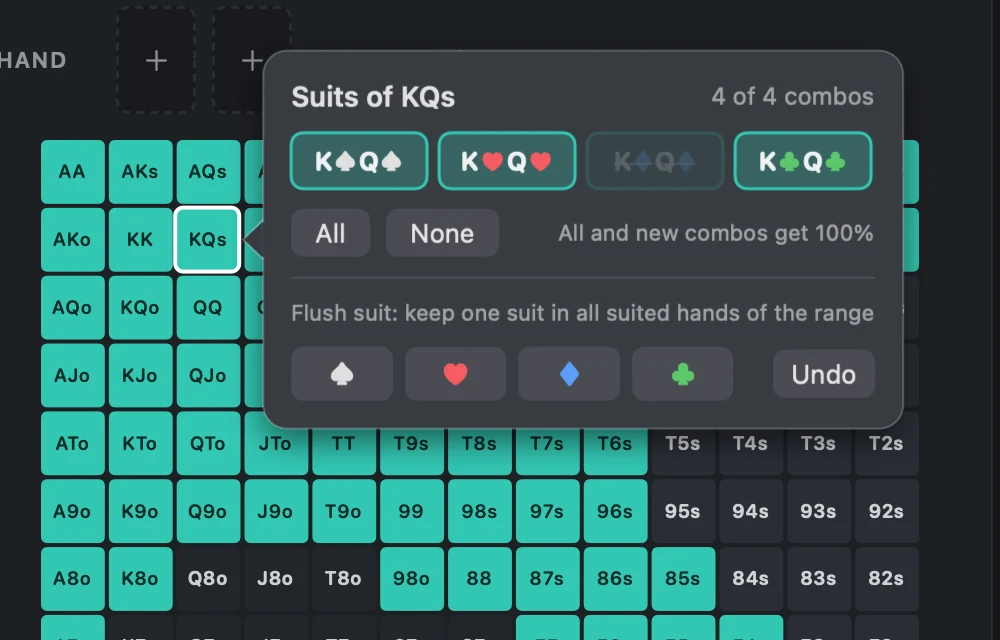
- Click a combo to turn it on or off.
- A struck-out combo holds a board card, or a card of another player’s exact hand. It can’t be dealt, so it doesn’t count.
- The header counts the combos that are on, for example “4 of 4 combos”.
- All and None turn all combos of the hand on or off. All uses the brush weight: the line next to them says which, for example “All and new combos get 100%”.
- Weights: when the combos share a weight below 100%, one line under the header says so, for example “Weight 50%: each combo is played 50% of the time”. When the weights differ, each combo shows its own.
- Flush suit keeps one suit in all suited hands of the range. A click on ♥ keeps only the heart combos of each suited hand.
- Undo goes back one step.
Menus and keys
| Menu | Item | Key |
|---|---|---|
| Equity | Calculate | ⌘Return |
| Equity | Stop | ⌘. |
| Solver | Open Solver | ⇧⌘S |
| Solver | Solve, Stop the Solve | |
| Flopscope | About Flopscope | |
| Flopscope | License… | |
| Flopscope | Buy Flopscope… (until the app is licensed) |
What Flopscope keeps
Flopscope saves the ranges, the board, the brush and the open tab. They come back at the next start.