Contents of the guide
The Solver window, part by part
The Solver window has three columns: the setup at the left, the strategy of the player to act in the centre, and the hands with their EV at the right. The numbers below match the markers in the picture.
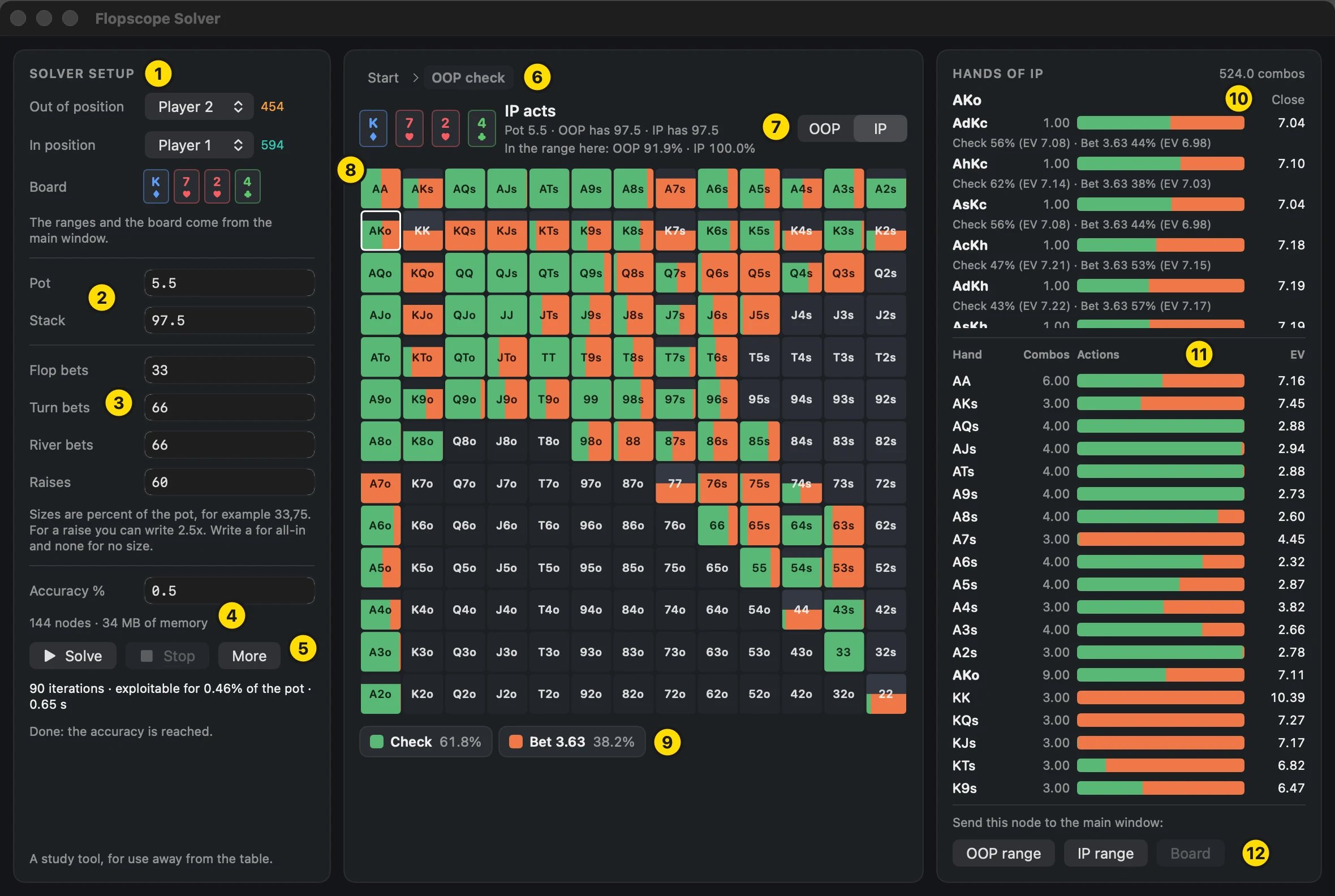
- Seats. Which player is out of position (OOP, acts first after the flop) and which is in position (IP). The number next to each is its combos. The board comes from the main window.
- Pot and stack. The chips in the pot at the start, and the chips that each player still has. Use one unit for both, for example big blinds.
- Bet sizes. Bets on the flop, the turn and the river, and raises, for both players. See Bet sizes below.
- Accuracy and size. The solve stops when a perfect opponent would win this percent of the pot or less. The line below says how large the solve is and how much memory it needs, before you click Solve.
- Solve, Stop, More. More runs more iterations on the same solve. The lines below show the progress and the result.
- Path. The actions so far. Click a step to go back to it.
- OOP | IP. Shows the hands of either player at this node. The lines at the left show the pot, the stacks, and the part of each start range that reaches this node.
- Strategy grid. Each cell is a hand of the player to act. The colours are its actions: green for check and call, blue for fold, and amber to red for bets and raises. The filled height is the part of the hand still in the range here.
- Actions. Each action, with how often the range takes it. Click one to go to the next node. When a turn or river card comes, pick the card.
- One hand. After a click on a hand in the grid or the list: each combo, how often it takes each action, and the EV of each action. Close hides it.
- Hand list. Each hand with its combos, its actions and its EV.
- Send to the main window. OOP range, IP range and Board send this node to the main window. There you can read its equity and its board hits. Undo in the main window brings the old range back.
Bet sizes
| You type | It means |
|---|---|
33 |
A bet of 33% of the pot |
33,75 |
Two sizes: 33% and 75% of the pot |
2.5x |
A raise to 2.5 times the bet (Raises field only) |
60 in Raises |
A raise of 60% of the pot after the call |
a |
All-in |
none |
No bet of this kind |
- A street has at most 4 bets and raises. The fourth is an all-in.
- A bet that puts 67% of the start stack in, or more, becomes an all-in.
- The sizes are the same for the two players.
EV and accuracy
- EV is in the unit of the pot and the stacks, and it counts from the start of the solve. A fold at the first decision is worth 0. The EVs of the two players add up to the start pot.
- Accuracy of 0.5% means that a perfect opponent would win 0.5% of the start pot more, on average, than against this strategy.
- A rare line is less exact. An orange note marks a node that few hands reach.
- The solver reads the ranges and the board of the main window when you click Solve. A change after that shows a note, and the solve on screen stays.
- A solve stops at 2,000 iterations at most. A tree that needs more than 60% of the Mac’s memory is refused.